Hello!
Anyone knows if it is possible to select a radio option within a form based on a URL parameter.
I was used to doing it with Piotnet Forms, but I am trying to switch into Bricksforge as much as I can.
In Piotnet Forms I add ?in=VALUE and that’s all.
Is it possible to do the same with Bricksforge? All I want is the form being pre-populated when a user comes from a specific button.
Thanks! 
Isaura
Hey lsaura! 
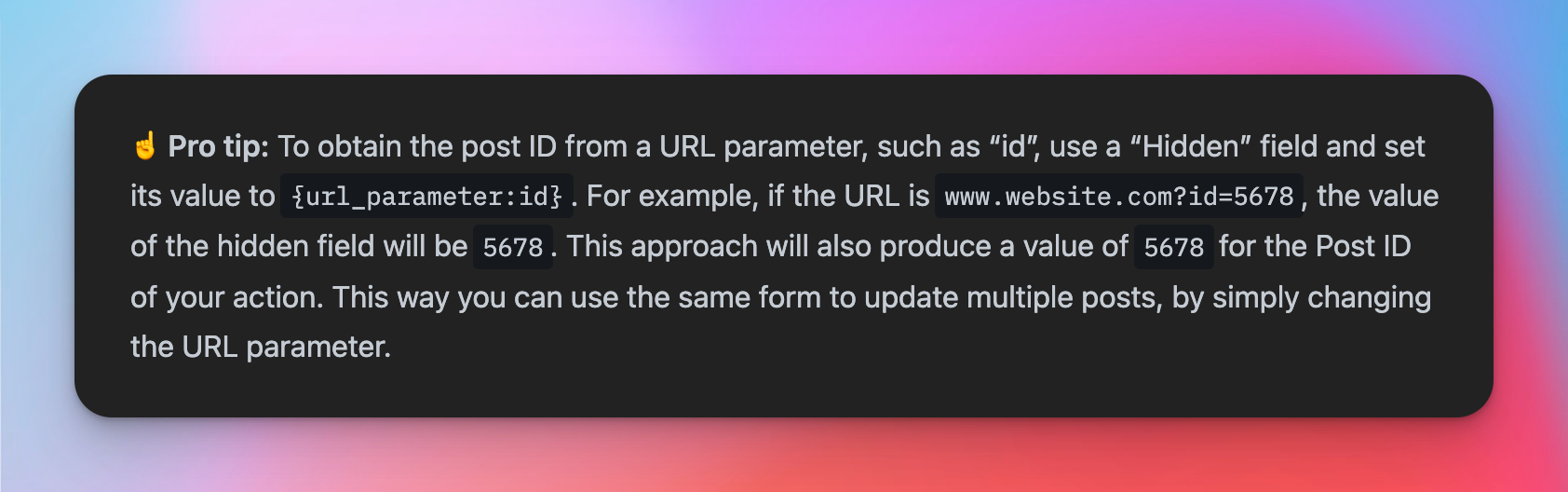
That’s already possible using Bricks Dynamic Data Tags. Here a screenshot from our documentation:
Hey Daniele!
I am not sure if I am getting this right… But I am not sure what to do with this info 
What I need is:
- I have a form with multiple fields. One of them is a radio field.
- The radio have different options. Let’s say A, B, C.
I would like to pre-populate the radio field with either A, B or C pre-selected based on a URL parameter.
For example: if my URL is Example Domain, then when the user access to the page with the form, the A radio button would be selected.
Is this possible?
Thank you Daniele!!
Hey knut!
yeah, exactly this is possible using the recommended steps. Feel free to send me access to your site. I can setup a minimal example. Then, you can try to understand what it does and extend it
Hi Daniele!
That would be amazing How can I send you the credentials privately?
Feel free to use private messages here in the forum  Or alternatively, hello@bricksforge.io or Facebook. Choose the way you like
I am posting the solution Daniele showed me, just for future reference and if someone is looking to do the same:
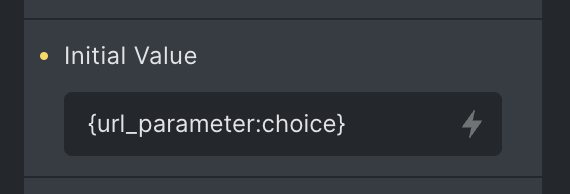
In the field you would like to auto-populate you need to add an initial value of {url_parameter:choice}. You can change choice for whatever word you want.
Just that! Now you are able to pre-populate a radio field with the value you place on the URL after the ?choice=XXX
For example, if you go to yourcompany.com - Diese Website steht zum Verkauf! - Informationen zum Thema yourcompany., the radio with the value Website will be pre-checked for the user.
Thanks Daniele for your help
1 Like