Currently, when adding a Honeypot field to Pro Forms, the HTML output heavily exposes its true purpose to automated bots. The wrapper is hardcoded with classes like brxe-brf-pro-forms-field-honeypot, and the label is hardcoded as "Guardian".
Modern botnets easily parse the DOM for keywords like “honeypot” or hidden radio buttons with bizarre labels and simply bypass them, rendering the protection useless.
The Solution: Please allow customization of the Honeypot field settings (similar to how Native Bricks Forms handles them). We need the ability to:
Customize the Label and ID (e.g., allow us to name it “Secondary Email” or “Website”).
Change the Input Type (allow it to be a standard text or email input rather than just a radio button).
Remove hardcoded honeypot CSS classes from the wrapper so we can camouflage it among legitimate fields using our own utility classes for visual hiding (like an accessible .sr-only class).
Why this matters: True honeypot security relies on the field looking structurally identical to a real input so bots blindly fill it out. Giving us control over the field’s markup will drastically reduce spam without forcing us to rely strictly on third-party JS integrations like Turnstile.
****And yes AI generated the request after I explained the issue.
I think the honeypot is more of a prebuilt field for those who don’t know how to set up an honeypot.
As far as i can tell you look the kind of user who is capable enough to handle a custom honeypot with other field types and the field style, attributes and validation settings.
I don’t think the first kind of guy would tinker much with the options you are suggesting.
The honeypot as is is bypassed easily so in the end it is almost useless no matter the user expertise level. Creating a custom one requires to use logic and keep up with it in updates. Bricks native forms allow you to use any field as Honeypot, this is what I mean.
Unless I missing something, the only way to add a proper Honeypot right now is to intervene with code.
You might consider setting the tabindex attribute to prevent tab selection.
Also, usually the correct practice for an hp is to return a success and not an error and then handle the spam according to your needs (see conditional actions)
Hi everyone, and thanks @Jargon for the detailed write-up
You’re right about how the current field is built: the built-in Honeypot renders a fixed markup with the brxe-brf-pro-forms-field-honeypot wrapper class, a hardcoded Guardian label, and a single hidden radio input with a fixed name/id (form-field-guardian42). The server-side spam check looks specifically for that field, so at the moment the label, id, input type and wrapper classes are not customizable from the UI.
Good news: we’ve put this on our list and will implement it. The goal is exactly what you described — making the honeypot customizable (label, id, input type, wrapper classes) so it can blend in with your real fields instead of being easy to fingerprint.
@Andris: Until that ships, you don’t have to wait — the approach @mofo and @Jargon described works well today:
Add a normal field (text or email) with an innocuous label like “Website” or “Secondary Email”.
Give it your own class/attributes so it blends in with the real fields.
Hide it accessibly (the clip: rect(0 0 0 0) / off-screen technique @Jargon posted is better than display:none, since some bots skip display:none fields), and set tabindex="-1" so keyboard users never land on it.
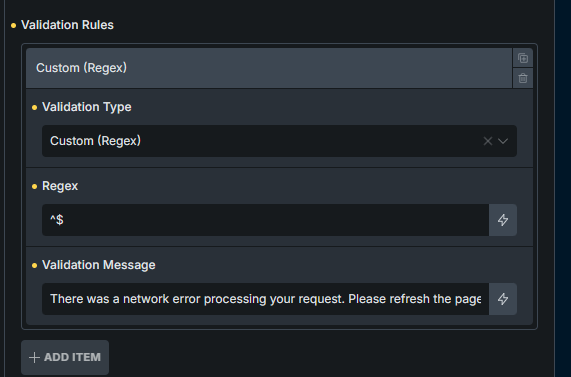
Use a Condition so the form only proceeds when that field is empty — a filled value means a bot. As @mofo noted, you can also choose to return a fake success and silently drop the submission via conditional actions instead of showing an error, which gives bots less feedback.
Good to hear the off-screen technique already stopped the spam for several of you. If you hit anything specific while wiring up the conditional logic, post your setup here and we’ll take a look.