Hello
Any info on how the format of this file ? I did not find any info in the documentation.
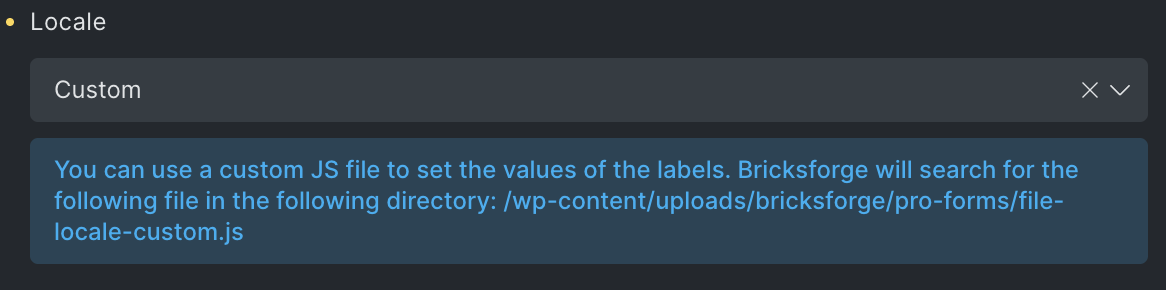
Hey 
I attach you the german file content for instance. You could just translate the strings:
const BricksforgeFileLocale = {
    labelIdle:
        'Dateien ablegen oder <span class="filepond--label-action"> auswählen </span>',
    labelInvalidField: "Feld beinhaltet ungültige Dateien",
    labelFileWaitingForSize: "Dateigröße berechnen",
    labelFileSizeNotAvailable: "Dateigröße nicht verfügbar",
    labelFileLoading: "Laden",
    labelFileLoadError: "Fehler beim Laden",
    labelFileProcessing: "Upload läuft",
    labelFileProcessingComplete: "Upload abgeschlossen",
    labelFileProcessingAborted: "Upload abgebrochen",
    labelFileProcessingError: "Fehler beim Upload",
    labelFileProcessingRevertError: "Fehler beim Wiederherstellen",
    labelFileRemoveError: "Fehler beim Löschen",
    labelTapToCancel: "abbrechen",
    labelTapToRetry: "erneut versuchen",
    labelTapToUndo: "rückgängig",
    labelButtonRemoveItem: "Entfernen",
    labelButtonAbortItemLoad: "Verwerfen",
    labelButtonRetryItemLoad: "Erneut versuchen",
    labelButtonAbortItemProcessing: "Abbrechen",
    labelButtonUndoItemProcessing: "Rückgängig",
    labelButtonRetryItemProcessing: "Erneut versuchen",
    labelButtonProcessItem: "Upload",
    labelMaxFileSizeExceeded: "Datei ist zu groß",
    labelMaxFileSize: "Maximale Dateigröße: {filesize}",
    labelMaxTotalFileSizeExceeded: "Maximale gesamte Dateigröße überschritten",
    labelMaxTotalFileSize: "Maximale gesamte Dateigröße: {filesize}",
    labelFileTypeNotAllowed: "Dateityp ungültig",
    fileValidateTypeLabelExpectedTypes:
        "Erwartet {allButLastType} oder {lastType}",
    imageValidateSizeLabelFormatError: "Bildtyp nicht unterstützt",
    imageValidateSizeLabelImageSizeTooSmall: "Bild ist zu klein",
    imageValidateSizeLabelImageSizeTooBig: "Bild ist zu groß",
    imageValidateSizeLabelExpectedMinSize:
        "Mindestgröße: {minWidth} × {minHeight}",
    imageValidateSizeLabelExpectedMaxSize:
        "Maximale Größe: {maxWidth} × {maxHeight}",
    imageValidateSizeLabelImageResolutionTooLow: "Auflösung ist zu niedrig",
    imageValidateSizeLabelImageResolutionTooHigh: "Auflösung ist zu hoch",
    imageValidateSizeLabelExpectedMinResolution:
        "Mindestauflösung: {minResolution}",
    imageValidateSizeLabelExpectedMaxResolution:
        "Maximale Auflösung: {maxResolution}",

    // generic
    labelReset: "Zurücksetzen",
    labelDefault: "Standard",
    labelAuto: "Autom.",
    labelNone: "Keine",
    labelEdit: "Bearbeiten",
    labelClose: "Schließen",
    labelSupportError: (features) =>
        `${features.join(", ")} wird in diesem Browser nicht unterstützt`,

    // defaults
    labelColor: "Farbe",
    labelWidth: "Breite",
    labelSize: "Größe",
    labelOffset: "Versatz",
    labelAmount: "Betragen",
    labelInset: "Vertiefung",
    labelRadius: "Radius",

    // sizes
    labelSizeExtraSmall: "Extraklein",
    labelSizeSmall: "Klein",
    labelSizeMediumSmall: "Mittelklein",
    labelSizeMedium: "Mittel",
    labelSizeMediumLarge: "Mittelgroß",
    labelSizeLarge: "Groß",
    labelSizeExtraLarge: "Extragroß",

    // unused?
    labelButtonRevert: "Rückgängig",
    labelButtonCancel: "Abbrechen",

    labelButtonUndo: "Zurücknehmen",
    labelButtonRedo: "Erneut durchführen",
    labelButtonExport: "Fertig",

    iconSupportError: `<g fill="none" stroke="currentColor" stroke-width="2"><path d="M10.29 3.86L1.82 18a2 2 0 0 0 1.71 3h16.94a2 2 0 0 0 1.71-3L13.71 3.86a2 2 0 0 0-3.42 0z"/><g><line x1="12" y1="9" x2="12" y2="13"/><line x1="12" y1="17" x2="12.01" y2="17"/></g>`,
    iconButtonClose:
        '<g fill="none" fill-rule="evenodd" stroke-linecap="round" stroke-linejoin="round" stroke="currentColor" stroke-width=".125em"><path d="M18 6L6 18M6 6l12 12"></path></path></g>',
    iconButtonRevert: `<g fill="none" fill-rule="evenodd" stroke-linecap="round" stroke-linejoin="round" stroke="currentColor" stroke-width=".125em"><path d="M7.388 18.538a8 8 0 10-2.992-9.03"/><path fill="currentColor" d="M2.794 11.696L2.37 6.714l5.088 3.18z"/><path d="M12 8v4M12 12l4 2"/></g>`,
    iconButtonUndo: `<g fill="none" fill-rule="evenodd" stroke-linecap="round" stroke-linejoin="round" stroke="currentColor" stroke-width=".125em"><path d="M10 8h4c2.485 0 5 2 5 5s-2.515 5-5 5h-4"/><path fill="currentColor" d="M5 8l4-3v6z"/></g>`,
    iconButtonRedo: `<g fill="none" fill-rule="evenodd" stroke-linecap="round" stroke-linejoin="round" stroke="currentColor" stroke-width=".125em"><path d="M14 8h-4c-2.485 0-5 2-5 5s2.515 5 5 5h4"/><path fill="currentColor" d="M19 8l-4-3v6z"/></g>`,
    iconButtonExport: `<polyline points="20 6 9 17 4 12" fill="none" stroke="currentColor" stroke-width=".125em"></polyline>`,

    // status
    statusLabelButtonClose: "Schließen",
    statusIconButtonClose:
        '<g fill="none" fill-rule="evenodd" stroke-linecap="round" stroke-linejoin="round" stroke="currentColor" stroke-width=".125em"><path d="M18 6L6 18M6 6l12 12"></path></path></g>',
    statusLabelLoadImage: (state) => {
        if (!state || !state.task) return "Warten auf Bild";
        if (state.error)
            return state.error.code === "IMAGE_TOO_SMALL"
                ? "Mindestgröße ist {minWidth} × {minHeight}"
                : "Fehler beim Laden des Bilds";
        if (state.task === "blob-to-bitmap") return "Bild wird geladen…";
        return "Vorschau wird erstellt…";
    },

    // processing status message
    statusLabelProcessImage: (state) => {
        if (!state || !state.task) return undefined;
        if (state.task === "store") {
            if (state.error) return "Fehler beim Hochladen des Bilds";
            return "Bild wird hochgeladen…";
        }
        if (state.error) return "Fehler bei Bildverarbeitung";
        return "Bild wird verarbeitet…";
    },
    annotateLabel: "Anmerken",
    annotateIcon:
        '<g stroke-width=".125em" stroke="currentColor" fill="none"><path d="M17.086 2.914a2.828 2.828 0 1 1 4 4l-14.5 14.5-5.5 1.5 1.5-5.5 14.5-14.5z"/></g>',
    cropLabel: "Zuschneiden",
    cropIcon:
        '<g stroke-width=".125em" stroke="currentColor" fill="none"><path d="M23 17H9a2 2 0 0 1-2-2v-5m0-3V1 M1 7h14a2 2 0 0 1 2 2v7m0 4v3"/></g>',
    cropIconButtonRecenter: `<path stroke="currentColor" fill="none" stroke-width="2" stroke-linejoin="bevel" d="M1.5 7.5v-6h6M1.5 16.5v6h6M22.5 16.5v6h-6M22.5 7.5v-6h-6"/><circle cx="12" cy="12" r="3.5" fill="currentColor" stroke="none"/>`,
    cropIconButtonRotateLeft:
        '<g stroke="none" fill="currentColor"><path fill="none" d="M-1-1h582v402H-1z"/><rect x="3" rx="1" height="12" width="12" y="9"/><path d="M15 5h-1a5 5 0 015 5 1 1 0 002 0 7 7 0 00-7-7h-1.374l.747-.747A1 1 0 0011.958.84L9.603 3.194a1 1 0 000 1.415l2.355 2.355a1 1 0 001.415-1.414l-.55-.55H15z"/></g>',
    cropIconButtonRotateRight:
        '<g stroke="none" fill="currentColor"><path fill="none" d="M-1-1h582v402H-1z"/><path d="M11.177 5H10a5 5 0 00-5 5 1 1 0 01-2 0 7 7 0 017-7h1.374l-.747-.747A1 1 0 0112.042.84l2.355 2.355a1 1 0 010 1.415l-2.355 2.354a1 1 0 01-1.415-1.414l.55-.55z"/><rect rx="1" height="12" width="12" y="9" x="9"/></g>',
    cropIconButtonFlipVertical:
        '<g stroke="none" fill="currentColor"><path d="M19.993 12.143H7a1 1 0 0 1-1-1V5.994a1 1 0 0 1 1.368-.93l12.993 5.15a1 1 0 0 1-.368 1.93z"/><path d="M19.993 14a1 1 0 0 1 .368 1.93L7.368 21.078A1 1 0 0 1 6 20.148V15a1 1 0 0 1 1-1h12.993z" opacity=".6"/></g>',
    cropIconButtonFlipHorizontal:
        '<g stroke="none" fill="currentColor"><path d="M11.93 7.007V20a1 1 0 0 1-1 1H5.78a1 1 0 0 1-.93-1.368l5.15-12.993a1 1 0 0 1 1.929.368z"/><path d="M14 7.007V20a1 1 0 0 0 1 1h5.149a1 1 0 0 0 .93-1.368l-5.15-12.993A1 1 0 0 0 14 7.007z" opacity=".6"/></g>',

    cropIconSelectPreset: (locale, aspectRatio) => {
        const [a, b, c] = !aspectRatio
            ? [0.2, 0.3, 0.4]
            : [
                  aspectRatio < 1 ? 1 : 0.3,
                  aspectRatio === 1 ? 0.85 : 0.5,
                  aspectRatio > 1 ? 1 : 0.3,
              ];
        return `<g fill="currentColor">
            <rect opacity="${a}" x="2" y="4" width="10" height="18" rx="1"/>
            <rect opacity="${b}" x="4" y="8" width="14" height="14" rx="1"/>
            <rect opacity="${c}" x="6" y="12" width="17" height="10" rx="1"/>
        </g>`;
    },

    cropIconCropBoundary: (locale, isBoundToImage) => {
        const [a, b, c, d] = isBoundToImage ? [0.3, 1, 0, 0] : [0, 0, 0.3, 1];
        return `<g fill="currentColor">
            <rect opacity="${a}" x="2" y="3" width="20" height="20" rx="1"/>
            <rect opacity="${b}" x="7" y="8" width="10" height="10" rx="1"/>
            <rect opacity="${c}" x="4" y="8" width="14" height="14" rx="1"/>
            <rect opacity="${d}" x="12" y="4" width="10" height="10" rx="1"/>
        </g>`;
    },

    cropLabelButtonRecenter: "Neu zentrieren",
    cropLabelButtonRotateLeft: "Nach links drehen",
    cropLabelButtonRotateRight: "Nach rechts drehen",
    cropLabelButtonFlipHorizontal: "Horizontal spiegeln",
    cropLabelButtonFlipVertical: "Vertikal spiegeln",

    cropLabelSelectPreset: "Form zuschneiden",

    cropLabelCropBoundary: "Rand zuschneiden",
    cropLabelCropBoundaryEdge: "Bildkante",
    cropLabelCropBoundaryNone: "Keine",

    cropLabelTabRotation: "Drehung",
    cropLabelTabZoom: "Zoom",
    decorateLabel: "Verzieren",
    decorateIcon:
        '<g fill="none" fill-rule="evenodd"><path stroke="currentColor" stroke-width=".125em" stroke-linecap="round" stroke-linejoin="round" d="M12 18.5l-6.466 3.4 1.235-7.2-5.23-5.1 7.228-1.05L12 2l3.233 6.55 7.229 1.05-5.231 5.1 1.235 7.2z"/></g>',
    filterLabel: "Filter",
    filterIcon:
        '<g stroke-width=".125em" stroke="currentColor" fill="none"><path d="M18.347 9.907a6.5 6.5 0 1 0-1.872 3.306M3.26 11.574a6.5 6.5 0 1 0 2.815-1.417 M10.15 17.897A6.503 6.503 0 0 0 16.5 23a6.5 6.5 0 1 0-6.183-8.51"/></g>',

    filterLabelChrome: "Chrom",
    filterLabelFade: "Verblassen",
    filterLabelCold: "Kalt",
    filterLabelWarm: "Warm",
    filterLabelPastel: "Pastell",
    filterLabelMonoDefault: "Mono",
    filterLabelMonoNoir: "Noir",
    filterLabelMonoWash: "Verwaschen",
    filterLabelMonoStark: "Hart",
    filterLabelSepiaDefault: "Sepia",
    filterLabelSepiaBlues: "Blues",
    filterLabelSepiaRust: "Rost",
    filterLabelSepiaColor: "Farbe",
    finetuneLabel: "Feinabstimmung",
    finetuneIcon:
        '<g stroke-width=".125em" stroke="currentColor" fill="none"><path d="M4 1v5.5m0 3.503V23M12 1v10.5m0 3.5v8M20 1v15.5m0 3.5v3M2 7h4M10 12h4M18 17h4"/></g>',

    finetuneLabelBrightness: "Helligkeit",
    finetuneLabelContrast: "Kontrast",
    finetuneLabelSaturation: "Sättigung",
    finetuneLabelExposure: "Belichtung",
    finetuneLabelTemperature: "Temperatur",
    finetuneLabelGamma: "Gamma",
    finetuneLabelClarity: "Schärfe",
    finetuneLabelVignette: "Vignette",
    frameLabel: "Rahmen",
    frameIcon: `<g fill="none" stroke-linecap="round" stroke-linejoin="round" stroke="currentColor" stroke-width=".125em">
            <rect x="2" y="2" width="20" height="20" rx="4"/>
            <rect x="6" y="6" width="12" height="12" rx="1"/>
        </g>`,

    frameLabelMatSharp: "Matt",
    frameLabelMatRound: "Abgeschrägt",
    frameLabelLineSingle: "Linie",
    frameLabelLineMultiple: "Zebra",
    frameLabelEdgeSeparate: "Vertiefung",
    frameLabelEdgeOverlap: "Plus",
    frameLabelEdgeCross: "Holz",
    frameLabelCornerHooks: "Haken",
    frameLabelPolaroid: "Polaroid",
    redactLabel: "Redigieren",
    redactIcon: `<g fill="none" stroke-linecap="round" stroke-linejoin="round" stroke="currentColor" stroke-width=".125em">
        <path d="M 4 5 l 1 -1"/>
        <path d="M 4 10 l 6 -6"/>
        <path d="M 4 15 l 11 -11"/>
        <path d="M 4 20 l 16 -16"/>
        <path d="M 9 20 l 11 -11"/>
        <path d="M 14 20 l 6 -6"/>
        <path d="M 19 20 l 1 -1"/>
    </g>`,
    resizeLabel: "Skalieren",
    resizeIcon:
        '<g stroke-width=".125em" stroke="currentColor" fill="none"><rect x="2" y="12" width="10" height="10" rx="2"/><path d="M4 11.5V4a2 2 0 0 1 2-2h14a2 2 0 0 1 2 2v14a2 2 0 0 1-2 2h-5.5"/><path d="M14 10l3.365-3.365M14 6h4v4"/></g>',

    resizeLabelFormCaption: "Bildausgabe-Größe",

    resizeLabelInputWidth: "b",
    resizeTitleInputWidth: "Breite",
    resizeLabelInputHeight: "h",
    resizeTitleInputHeight: "Höhe",

    resizeTitleButtonMaintainAspectRatio: "Seitenverhältnis bewahren",

    resizeIconButtonMaintainAspectRatio: (active, activeFraction) => `
        <defs>
            <mask id="mask1" x="0" y="0" width="24" height="24" >
                <rect x="0" y="0" width="24" height="10" fill="#fff" stroke="none"/>
            </mask>
        </defs>
        <g fill="none" fill-rule="evenodd">
            <g  mask="url(#mask1)">
                <path transform="translate(0 ${
                    (activeFraction - 1) * 3
                })" stroke="currentColor" stroke-width="1.5" stroke-linecap="round" d="M9.401 10.205v-.804a2.599 2.599 0 0 1 5.198 0V17"/>
            </g>
            <rect fill="currentColor" x="7" y="10" width="10" height="7" rx="1.5"/>
        </g>
    `,
    stickerLabel: "Sticker",
    stickerIcon:
        '<g fill="none" stroke-linecap="round" stroke-linejoin="round" stroke="currentColor" stroke-width=".125em"><path d="M12 22c2.773 0 1.189-5.177 3-7 1.796-1.808 7-.25 7-3 0-5.523-4.477-10-10-10S2 6.477 2 12s4.477 10 10 10z"/><path d="M20 17c-3 3-5 5-8 5"/></g>',
    shapeLabelButtonSelectSticker: "Bild wählen",
    shapeIconButtonSelectSticker: `<g fill="none" stroke="currentColor" stroke-width="0.0625em"><path d="M8 21 L15 11 L19 15"/><path d="M15 2 v5 h5"/><path d="M8 2 h8 l4 4 v12 q0 4 -4 4 h-8 q-4 0 -4 -4 v-12 q0 -4 4 -4z"/></g><circle fill="currentColor" cx="10" cy="8" r="1.5"/>`,

    shapeIconButtonFlipHorizontal: `<g stroke="currentColor" stroke-width=".125em"><path fill="none" d="M6 6.5h5v11H6z"/><path fill="currentColor" d="M15 6.5h3v11h-3z"/><path d="M11 4v16" fill="currentColor"/></g>`,
    shapeIconButtonFlipVertical: `<g stroke="currentColor" stroke-width=".125em"><rect x="7" y="8" width="11" height="5" fill="none"/><rect x="7" y="17" width="11" height="2" fill="currentColor"/><line x1="5" y1="13" x2="20" y2="13"/></g>`,
    shapeIconButtonRemove: `<g fill="none" fill-rule="evenodd"><path stroke="currentColor" stroke-width="2" stroke-linecap="round" stroke-linejoin="round" d="M7.5 7h9z"/><path d="M7.916 9h8.168a1 1 0 01.99 1.14l-.972 6.862a2 2 0 01-1.473 1.653c-.877.23-1.753.345-2.629.345-.876 0-1.752-.115-2.628-.345a2 2 0 01-1.473-1.653l-.973-6.862A1 1 0 017.916 9z" fill="currentColor"/><rect fill="currentColor" x="10" y="5" width="4" height="3" rx="1"/></g>`,
    shapeIconButtonDuplicate: `<g fill="none" fill-rule="evenodd"><path d="M15 13.994V16a2 2 0 01-2 2H8a2 2 0 01-2-2v-5a2 2 0 012-2h2.142" stroke="currentColor" stroke-width=".125em"/><path d="M15 9V8a1 1 0 00-2 0v1h-1a1 1 0 000 2h1v1a1 1 0 002 0v-1h1a1 1 0 000-2h-1zm-4-4h6a2 2 0 012 2v6a2 2 0 01-2 2h-6a2 2 0 01-2-2V7a2 2 0 012-2z" fill="currentColor"/></g>`,
    shapeIconButtonMoveToFront: `<g fill="none" fill-rule="evenodd"><rect fill="currentColor" x="11" y="13" width="8" height="2" rx="1"/><rect fill="currentColor" x="9" y="17" width="10" height="2" rx="1"/><path d="M11.364 8H10a5 5 0 000 10M12 6.5L14.5 8 12 9.5z" stroke="currentColor" stroke-width=".125em" stroke-linecap="round"/></g>`,

    shapeIconButtonTextLayoutAutoWidth:
        '<path fill="none" d="M9 15 L12 9 L15 15 M10 13.5 h3" stroke="currentColor" stroke-width=".125em"/>',
    shapeIconButtonTextLayoutAutoHeight: `<g fill="currentColor"><circle cx="4" cy="12" r="1.5"/><circle cx="20" cy="12" r="1.5"/></g><path fill="none" d="M9 15 L12 9 L15 15 M10 13.5 h3" stroke="currentColor" stroke-width=".125em"/>`,
    shapeIconButtonTextLayoutFixedSize: `<g fill="currentColor"><circle cx="5" cy="6" r="1.5"/><circle cx="19" cy="6" r="1.5"/><circle cx="19" cy="19" r="1.5"/><circle cx="5" cy="19" r="1.5"/></g><path fill="none" d="M9 15 L12 9 L15 15 M10 13.5 h3" stroke="currentColor" stroke-width=".125em"/>`,

    shapeTitleButtonTextLayoutAutoWidth: "Autom. Breite",
    shapeTitleButtonTextLayoutAutoHeight: "Autom. Höhe",
    shapeTitleButtonTextLayoutFixedSize: "Fixierte Größe",

    shapeTitleButtonFlipHorizontal: "Horizontal spiegeln",
    shapeTitleButtonFlipVertical: "Vertikal spiegeln",
    shapeTitleButtonRemove: "Entfernen",
    shapeTitleButtonDuplicate: "Duplizieren",
    shapeTitleButtonMoveToFront: "Nach vorne bewegen",

    shapeLabelInputText: "Text bearbeiten",

    shapeIconInputCancel: `<g fill="none" fill-rule="evenodd" stroke-linecap="round" stroke-linejoin="round" stroke="currentColor" stroke-width=".125em"><path d="M18 6L6 18M6 6l12 12"/></g>`,
    shapeIconInputConfirm: `<g fill="none" fill-rule="evenodd" stroke-linecap="round" stroke-linejoin="round" stroke="currentColor" stroke-width=".125em"><polyline points="20 6 9 17 4 12"/></g>`,
    shapeLabelInputCancel: "Abbrechen",
    shapeLabelInputConfirm: "Bestätigen",

    shapeLabelStrokeNone: "Keine Kontur",

    shapeLabelFontStyleNormal: "Normal",
    shapeLabelFontStyleBold: "Fett",
    shapeLabelFontStyleItalic: "Kursiv",
    shapeLabelFontStyleItalicBold: "Fett kursiv",

    shapeTitleBackgroundColor: "Füllfarbe",

    shapeTitleFontFamily: "Schriftart",
    shapeTitleFontSize: "Schriftgröße",
    shapeTitleFontStyle: "Schriftstil",

    shapeTitleLineHeight: "Zeilenhöhe",

    shapeTitleLineStart: "Start",
    shapeTitleLineEnd: "Ende",
    shapeTitleStrokeWidth: "Linienbreite",
    shapeTitleStrokeColor: "Linienfarbe",

    shapeTitleLineDecorationBar: "Balken",
    shapeTitleLineDecorationCircle: "Kreis",
    shapeTitleLineDecorationSquare: "Quadrat",
    shapeTitleLineDecorationArrow: "Pfeil",
    shapeTitleLineDecorationCircleSolid: "Vollfarbe-Kreis",
    shapeTitleLineDecorationSquareSolid: "Vollfarbe-Quadrat",
    shapeTitleLineDecorationArrowSolid: "Vollfarbe-Pfeil",

    shapeIconLineDecorationBar: `<g stroke="currentColor" stroke-linecap="round" stroke-width=".125em"><path d="M5,12 H16"/><path d="M16,8 V16"/></g>`,
    shapeIconLineDecorationCircle: `<g stroke="currentColor" stroke-linecap="round"><path stroke-width=".125em" d="M5,12 H12"/><circle fill="none" stroke-width=".125em" cx="16" cy="12" r="4"/></g>`,
    shapeIconLineDecorationSquare: `<g stroke="currentColor" stroke-linecap="round"><path stroke-width=".125em" d="M5,12 H12"/><rect fill="none" stroke-width=".125em" x="12" y="8" width="8" height="8"/></g>`,
    shapeIconLineDecorationArrow: `<g stroke="currentColor" stroke-linecap="round" stroke-width=".125em"><path d="M5,12 H16 M13,7 l6,5 l-6,5" fill="none"/></g>`,
    shapeIconLineDecorationCircleSolid: `<g stroke="currentColor" stroke-linecap="round"><path stroke-width=".125em" d="M5,12 H12"/><circle fill="currentColor" cx="16" cy="12" r="4"/></g>`,
    shapeIconLineDecorationSquareSolid: `<g stroke="currentColor" stroke-linecap="round"><path stroke-width=".125em" d="M5,12 H12"/><rect fill="currentColor" x="12" y="8" width="8" height="8"/></g>`,
    shapeIconLineDecorationArrowSolid: `<g stroke="currentColor" stroke-linecap="round" stroke-width=".125em"><path d="M5,12 H16"/><path d="M13,7 l6,5 l-6,5z" fill="currentColor"/></g>`,

    shapeTitleColorTransparent: "Transparent",
    shapeTitleColorWhite: "Weiß",
    shapeTitleColorSilver: "Silber",
    shapeTitleColorGray: "Grau",
    shapeTitleColorBlack: "Schwarz",
    shapeTitleColorNavy: "Marineblau",
    shapeTitleColorBlue: "Blau",
    shapeTitleColorAqua: "Aquamarin",
    shapeTitleColorTeal: "Blaugrün",
    shapeTitleColorOlive: "Olive",
    shapeTitleColorGreen: "Grün",
    shapeTitleColorYellow: "Gelb",
    shapeTitleColorOrange: "Orange",
    shapeTitleColorRed: "Rot",
    shapeTitleColorMaroon: "Kastanienbraun",
    shapeTitleColorFuchsia: "Purpurrot",
    shapeTitleColorPurple: "Lila",

    shapeTitleTextColor: "Schriftfarbe",
    shapeTitleTextAlign: "Textausrichtung",
    shapeTitleTextAlignLeft: "Text links ausrichten",
    shapeTitleTextAlignCenter: "Text zentrieren",
    shapeTitleTextAlignRight: "Text rechts ausrichten",

    shapeIconTextAlignLeft: `<g stroke-width=".125em" stroke="currentColor"><line x1="5" y1="8" x2="15" y2="8"/><line x1="5" y1="12" x2="19" y2="12"/><line x1="5" y1="16" x2="14" y2="16"/></g>`,
    shapeIconTextAlignCenter: `<g stroke-width=".125em" stroke="currentColor"><line x1="7" y1="8" x2="17" y2="8"/><line x1="5" y1="12" x2="19" y2="12"/><line x1="8" y1="16" x2="16" y2="16"/></g>`,
    shapeIconTextAlignRight: `<g stroke-width=".125em" stroke="currentColor"><line x1="9" y1="8" x2="19" y2="8"/><line x1="5" y1="12" x2="19" y2="12"/><line x1="11" y1="16" x2="19" y2="16"/></g>`,

    shapeLabelToolSharpie: "Marker",
    shapeLabelToolEraser: "Radierer",
    shapeLabelToolRectangle: "Rechteck",
    shapeLabelToolEllipse: "Ellipse",
    shapeLabelToolArrow: "Pfeil",
    shapeLabelToolLine: "Linie",
    shapeLabelToolText: "Text",
    shapeLabelToolPreset: "Sticker",

    shapeIconToolSharpie: `<g stroke-width=".125em" stroke="currentColor" fill="none"><path d="M2.025 5c5.616-2.732 8.833-3.857 9.65-3.374C12.903 2.351.518 12.666 2.026 14 3.534 15.334 16.536.566 17.73 2.566 18.924 4.566 3.98 17.187 4.831 18c.851.813 9.848-6 11.643-6 1.087 0-2.53 5.11-2.92 7-.086.41 3.323-1.498 4.773-1 .494.17.64 2.317 1.319 3 .439.443 1.332.776 2.679 1" stroke="currentColor" stroke-width=".125em" fill="none" fill-rule="evenodd" stroke-linejoin="round"/></g>`,
    shapeIconToolEraser: `<g stroke-width=".125em" stroke="currentColor" stroke-linecap="round" fill="none"><g transform="translate(3, 15) rotate(-45)"><rect x="0" y="0" width="18" height="10" rx="3"/></g><line x1="11" y1="21" x2="18" y2="21"/><line x1="20" y1="21" x2="22" y2="21"/></g>`,
    shapeIconToolRectangle: `<g stroke-width=".125em" stroke="currentColor" fill="none"><rect x="2" y="2" width="20" height="20" rx="3"/></g>`,
    shapeIconToolEllipse: `<g stroke-width=".125em" stroke="currentColor" fill="none"><circle cx="12" cy="12" r="11"/></g>`,
    shapeIconToolArrow: `<g stroke-width=".125em" stroke="currentColor" fill="none"><line x1="20" y1="3" x2="6" y2="21"/><path d="m10 5 L22 1 L21 13" fill="currentColor" stroke="none"/></g>`,
    shapeIconToolLine: `<g stroke-width=".125em" stroke="currentColor" fill="none"><line x1="20" y1="3" x2="6" y2="21"/></g>`,
    shapeIconToolText: `<g stroke="none" fill="currentColor" transform="translate(6,0)"><path d="M8.14 20.085c.459 0 .901-.034 1.329-.102a8.597 8.597 0 001.015-.21v1.984c-.281.135-.695.247-1.242.336a9.328 9.328 0 01-1.477.133c-3.312 0-4.968-1.745-4.968-5.235V6.804H.344v-1.25l2.453-1.078L3.89.819h1.5v3.97h4.97v2.015H5.39v10.078c0 1.031.245 1.823.735 2.375s1.161.828 2.015.828z"/>`,
    shapeIconToolPreset: `<g fill="none" stroke-linecap="round" stroke-linejoin="round" stroke="currentColor" stroke-width=".125em"><path d="M12 22c2.773 0 1.189-5.177 3-7 1.796-1.808 7-.25 7-3 0-5.523-4.477-10-10-10S2 6.477 2 12s4.477 10 10 10z"></path><path d="M20 17c-3 3-5 5-8 5"></path></g>`,
};
Hi, I started playing with this and it makes me shrug.
BF is providing a restricted number of translations, and a way to use a single custom translation.
I may be unable to spot how to handle this the easy way, but I actually have two issues:
- for every single upload field i have on a website to replicate the field and set the strings for every single language.
- it is not possible to create js config file for more than one language.
I also tried to fetch labels from dynamic data via acf, but that does not seem to work as well.
Is there actually a workaround to this?
It would be useful if the user could actually give a path to the js file to use, eventually using dynamic data to fetch the file according to current language.
Hey, and thanks for the detailed feedback.
You’ve understood the current mechanism correctly, so let me confirm how it works today and give you a workaround for the multi-language case.
How the custom locale file is loaded today
When you set the File field’s Locale to Custom, Bricksforge enqueues exactly one file from a fixed location:
/wp-content/uploads/bricksforge/pro-forms/file-locale-custom.js
That file is expected to define a single global object, BricksforgeFileLocale (the format I posted above). At runtime the field reads that global and merges it into the FilePond instance. So you’re right on both points:
- There is currently no setting to point the field at a different file path.
- The built-in Custom option only supports one file / one BricksforgeFileLocale object, so it isn’t a per-language switch out of the box.
Workaround for multiple languages (works with the current code)
Because file-locale-custom.js is loaded as a plain script and the field only reads the BricksforgeFileLocale global at runtime, you can let that single file decide the language itself. For example, detect the active language and assign the matching strings:
// /wp-content/uploads/bricksforge/pro-forms/file-locale-custom.js
const lang = document.documentElement.lang || 'en'; // or read a WPML/Polylang marker

const strings = {
  de: { labelIdle: 'Dateien ablegen oder ...', /* ... */ },
  fr: { labelIdle: 'Deposez vos fichiers ou ...', /* ... */ },
};

const BricksforgeFileLocale = strings[lang.slice(0, 2)] || strings.de;
This way you keep Locale = Custom on every File field and don’t have to duplicate fields per language. You set Custom once and the file resolves the right strings on each page.
The individual label fields + dynamic data
The per-label text fields under Labels are output as plain strings and are not run through Bricks’ dynamic data parser, so {acf_…} tags won’t be resolved there. That’s why your ACF attempt didn’t take effect. For now the JS approach above is the reliable route; if you want the strings to come from ACF, that fetch would need to happen in that JS file (or via your own code) rather than in the label fields.
Hope that helps for the multi-language setup — let me know if anything’s unclear.
Best,
Daniele
IG that does work, even tho it means loading all strings for all locale every time… but that’s something I could tinker or live with, since it only happens on field uploader forms.
Thank you for your answer. You should put this stuff in the doc, it’s pretty useful. 
1 Like
Glad that works for you, and you’re right — loading all locales in the one file and letting it pick by language is the trade-off here, but since it only runs on pages with an upload field the cost is negligible.
Good shout on the documentation too — it’s a genuinely useful pattern to have written down.
If you ever hit an edge case with the language detection (WPML/Polylang markers, a custom lang attribute, etc.), just post the setup here and I’ll help you wire it up.
Best,
Daniele