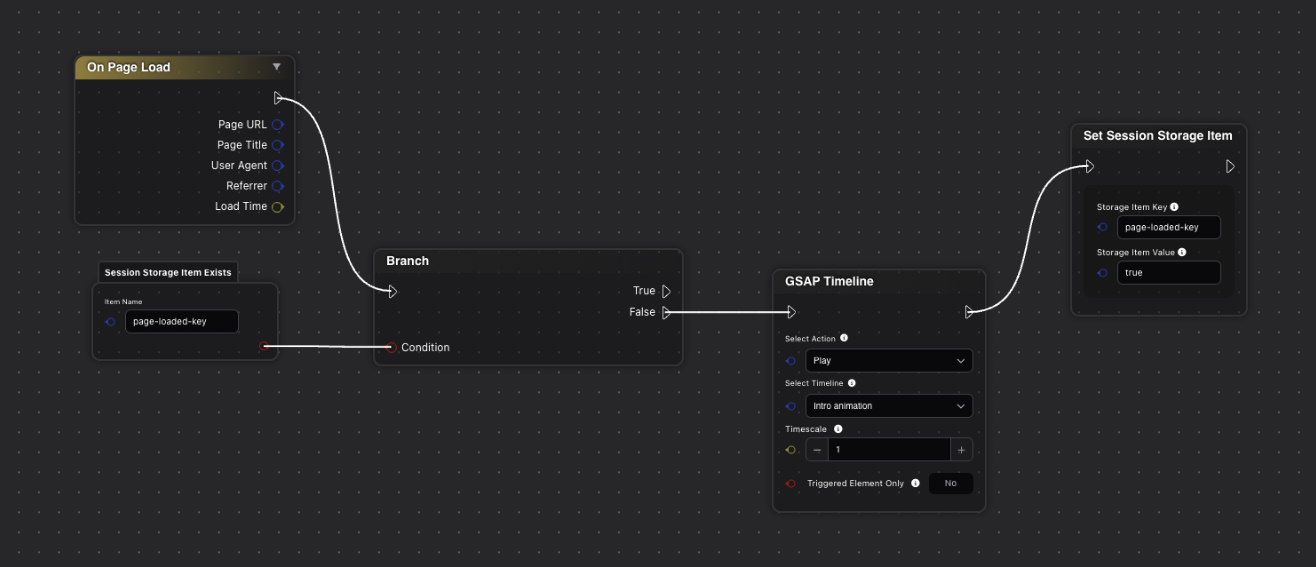
Hi team and community
I’m looking to implement a session-based animation trigger where animations play only once per browser session, not on every page revisit.
What I want to achieve:
User visits Home page → animation plays (in Bricksforge, most of the time I use ScrollTrigger, sometimes Pageload) ✓
User navigates to Contact page → returns to Home → animation doesn’t replay ✓
User refreshes browser or opens new tab → animation resets and plays again ✓
Ideally, (this is not a must-have), I would like to have this solution page or URL-based. Meaning some pages should follow this, some pages might be excluded from this, and simply follow the current approach (animations play on page visits every time)
Current approach: I can achieve this with custom JavaScript using sessionStorage, but I believe the new Node Editor might have built-in functionality for this.
Questions:
- Does the Node Editor have session storage nodes or “play once” triggers?
- Can I set up conditional animation playback based on sessionStorage values?
- Are there specific nodes for detecting “first visit vs revisit” within the same session?
- Any documentation or examples for session-based animation control?
Use case: I have text animations and element reveals that should create impact on first visit, but become distracting when replaying on every navigation.
Bascially I want animations to play on first visit but not replay when users navigate back to the same page (until browser refresh/new session).
Is this possible with built-in nodes, or do I still need custom JavaScript with sessionStorage?
Any guidance would be much appreciated!
Thanks!