Hi, i stuck by adding an animation workflow. I use BricksForge and have several texts in one section that have different animations. Each text has its own timeline that is called up via individual classes. When I call up the page, I would now like to animate the texts one after the other without having to set a delay in the respective timelines, as I would also like to use the animation in other sections where the order may be different. I could make an animation timeline for every section but I would like to use one animation in different spots on the website - so its much easier to change it everywhere in stead of looking for every timeline. Does anyone know how i can do this? I tryed the nodeeditor buts it’s way to difficult for me to understand in which order I have to do something.
Hi,
is a bit difficult to understand your goal without an example: are animations triggered by scroll or not? As a rule of thumb I’ll avoid delay and use stagger to get the delayed/staggered effect and if the animations are with scrolltrigger use the scroll percentage to control their behaviour sitewide.
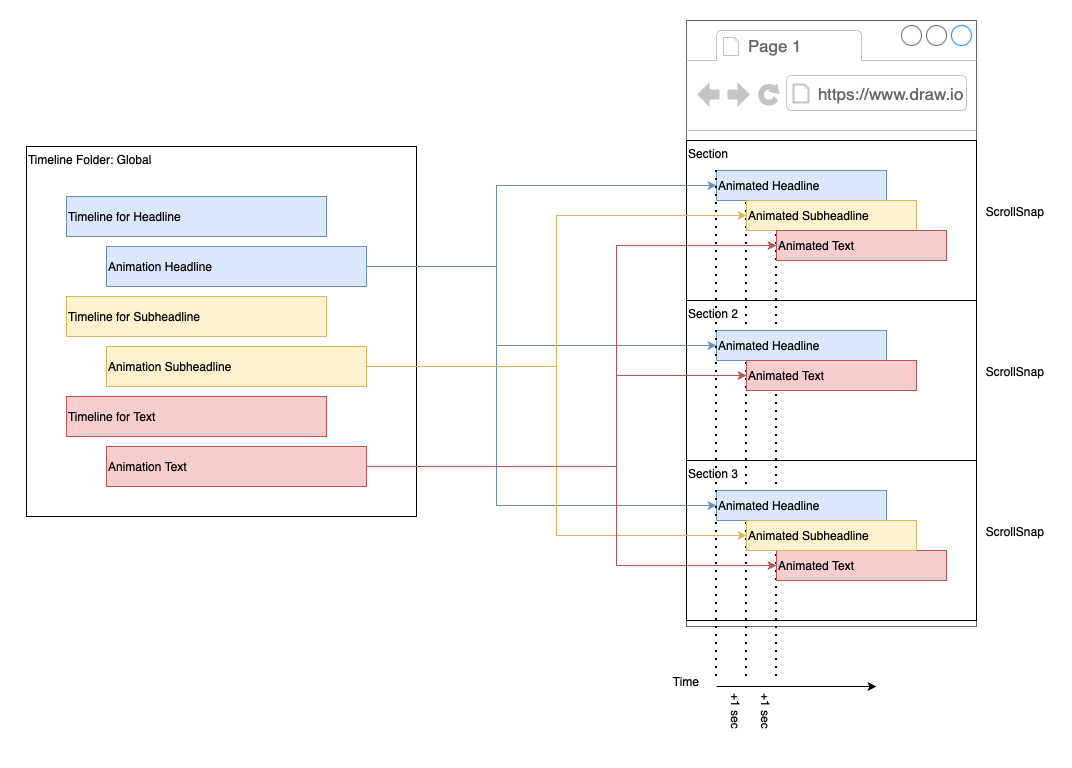
Hi Filippo, I tried to visualize my needs. I want to create one animation per textfield and arrange the text fields in different ways. the animation should always be the same (timeline) because of the animation.
Example:
Section: Animated Headline will be at 0 sec, Subheadline at +1 sec and Text also +1 sec
Section 2: Animated Headline will be at 0 sec and Text at +1 sec
For all animation I would like to use the same animation style but in different timings.
Hope its getting more clear now ^^
Hi,
I’ve created a quick Bricksforge playground here:
User: trybricksforge
Password: playground
Here a page to start with:
Currently the text item are set “for each” and then staggered but is possible to build also in other ways, it depends on the animation you are looking for.
Isen’t there any codepen that show the whole idea?
Hi, thank you so far - I’ve rearranged your test animation with this what I want to achieve. I’ve created second text-reveal timeline. So I hope its a little more clear what I want to have.
It seems ok to me now.
Main timeline is staggered so animations have always 1s delay in between. We have 3 text reveal global classes = 3 individual animation.
Ho, ok - I think I can handle it now a little better in my instance.
I think there are some bugs in the frontend of the animation editing things because I copied your setting exact but the behavior on my site was always a little bit different than yours. e.g. custom position was empty in your version and it works like intended. In my instance there was always a delay between the first and the third animation when I didn’t use the subheadline.
Nevertheless I thing I can handle it now much better.
I think I found a bug.
I added a basic text field and configured it with stagger and split text (lines).
When I use “split text with words” - everything is fine.
When I use it with “split text with lines” there is always a line break in the animation when there is a tag in the text like < b > or something else.
I made an example in the playground.