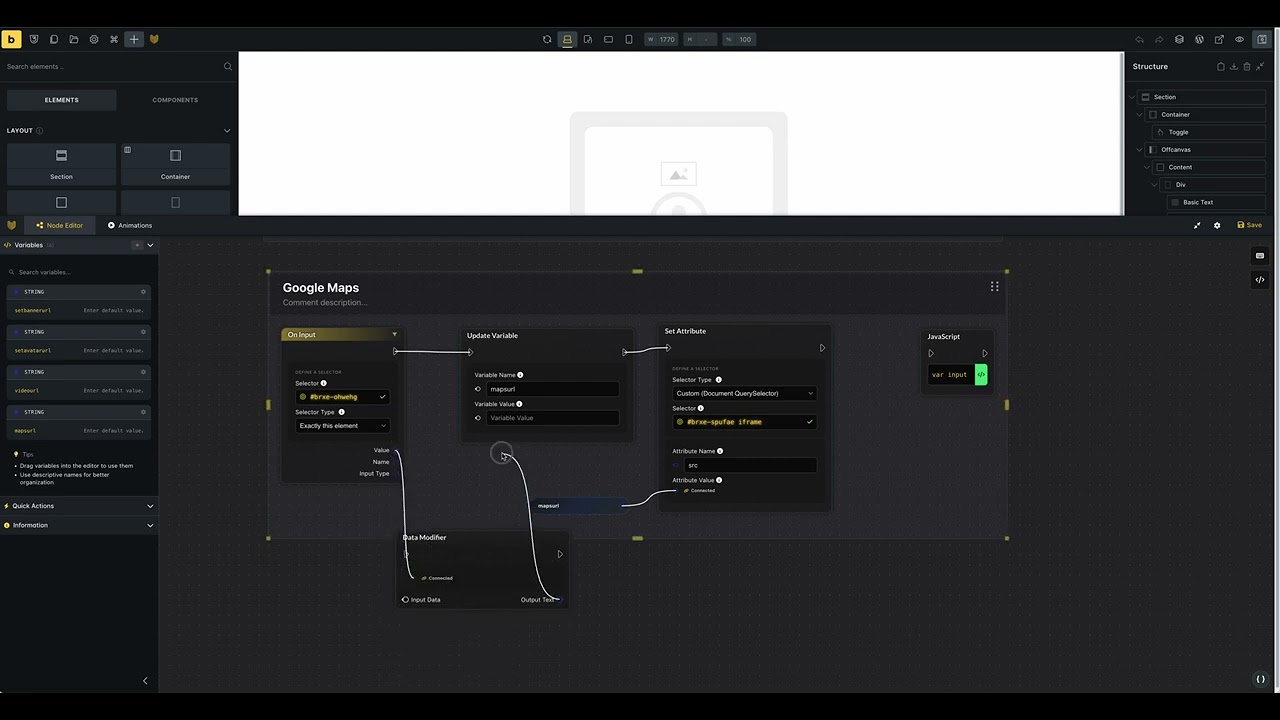
Hi there i just noticed when i try to use the “Data Modifier”-Element in the Node Editor its not working. I place the Element and save my Nodes and after reloading without cache it disapears.
Each node must be part of your workflow and must be connected to the execution nodes, which are the triangles on the left and right, to be integrated into the workflow.
Your data modifier node is outside of the workflow, so it will never be triggered. So just incorporate them as part of your workflow, for example as the first step after the event.
Then you can work with the data in the following nodes.
I was a bit lazy, so I did not connect the execution nodes, but I will give you an example that I have the same problem even I connect them as you wanted. In the following video, I also added a part where I added a random “Update Variable” element and did not connect the execution node triangles and refreshed the site. They stay where they are, but the Data Modifier Element disappears after refreshing the site. And I tested if it occurs with site loading with cache and without and yeah it doesn’t make any difference. So in my opinion, there is a bug with the Data Modifier element.
Hi Daniele i tested it in the Bricksforge Sandbox and was not able to reproduce it. But then i found out when i deactivate the Firewall plugin “Wordfence” the bug is not appearing.
The Problem is that i really need my Firewall so do you have an idea what i need to set up that the problem does not appear?
All right thx to Chat GPT i got a workthrough how to detect the blocked line with the WAF in learning mode and then allowing the reques with the live traffic filter. Now its working
If somebody else is having this issue check the live traffice for this:
[YOURDOMAIN]}/?bricks=run&brf-panel=1 and was blocked by firewall for XSS: Cross Site Scripting in POST body: window_performance_timing){const_e=window.performance.timing%3Breturn%20e.loadEventEnd-e.navigationStart%7Dreturn%20null%7D%22%7D%5D%2C… at [YOURDOMAIN]/wp-json/bricksforge/v1/save_option
You can add it to your allow list with “ADD PARAM TO FIREWALL ALLOWLIST”.
@Daniele maybe you have a clue why Wordfence is blocking the save_option when i added the “data modifier”-Element.