Hi, can someone explain to me exactly how steps in a multi-step form are supposed to work? I know I can assign conditions to the steps—does that mean if a condition is not met, the step is not rendered and the next one in the hierarchy is queried instead? If so, I think I’ve found a bug.
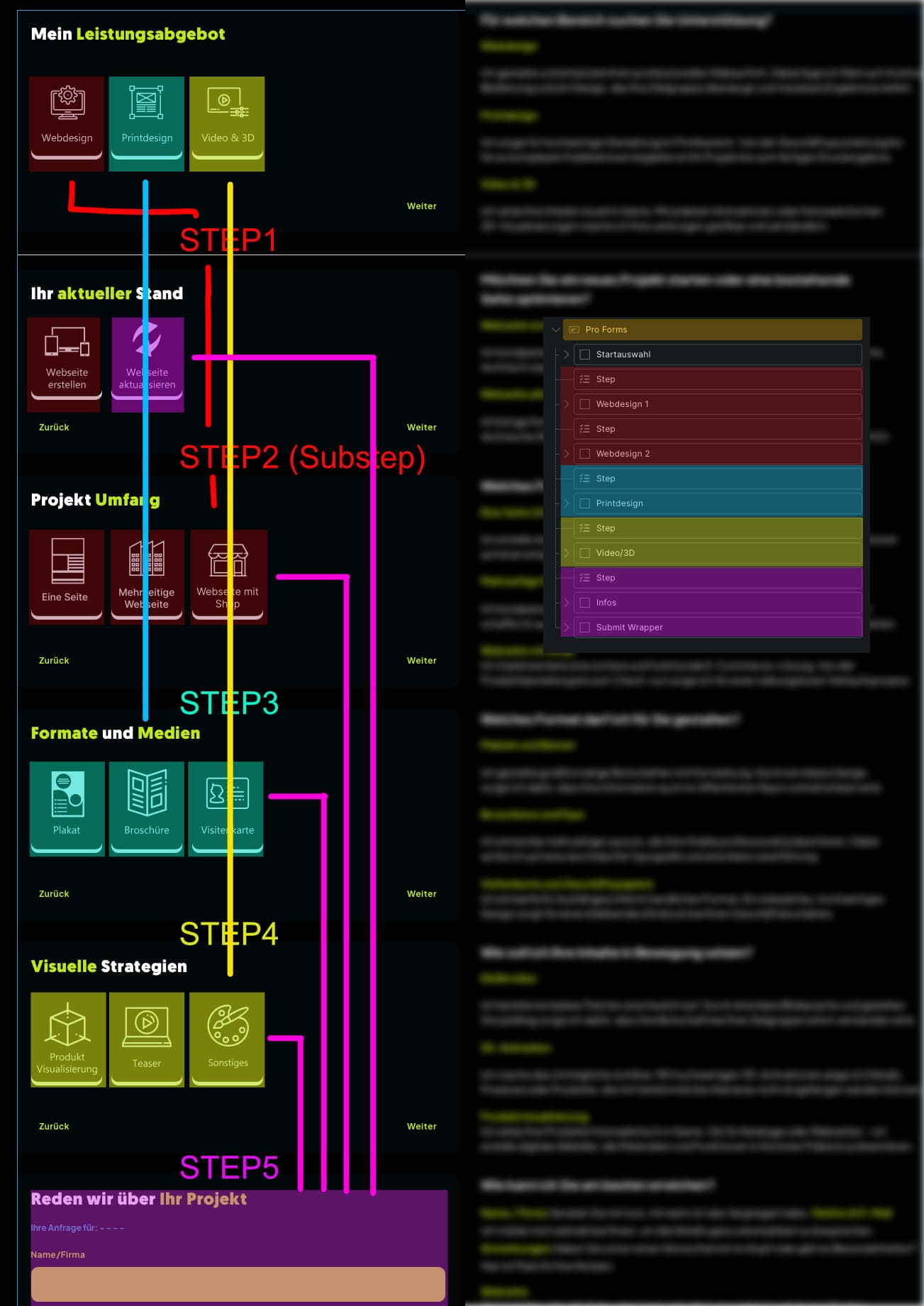
I have a contact form where the user chooses one of three options in the first step.
Next step: This should be active if Option 1 was selected.
Following step: This should only be active if a specific value was selected from Option 1.
Subsequent steps: These are active if either Option 2 or Option 3 was selected.
Final section: At the end, there is a section where the user can enter general information (regardless of the previous steps).
I am sorry, but I really urgently need support with this!
If there is a bug with conditions in ‘Steps’, it makes no sense for me to check further configurations, as I won’t be able to actually solve the problem.
Please also refer to my ticket regarding Live Values and the behavior of Card-Radio options.
I purchased the Lifetime license back then (though I haven’t been able to fully test everything yet due to time constraints) and was quite convinced by the add-on. It would be a great shame if these kinds of issues prevent me from being able to use it.
I am having exactly the same issue, and came on here to look if there wars a fix! Im creating a form to colect charity information and starting with 4 radio card options to decide what type of direction to go to serve up the corect form, and then have a step before each different form, with conditional logic depending on the button selection to what forms to show. it ends up regardless of selection showing the first step.
The only way around this so far is to remove the step andreplace it with a conditional wrapper, that works, but it’s not how I want it to look. But I have to present something to the client. Would love to know if it’s a bug, or if I missunderstand the use of the steps in this.
I have already attempted a workaround using the Conditional Wrapper, but it only works partially when dealing with steps on a third level. In my specific case, sections of the form fail to render entirely.
It appears to be a fundamental bug in the steps functionality. I’ve noticed similar issues with Live Values, where conditions also fail to trigger correctly. I have tested every possible configuration, but nothing has worked.
Frankly, the lack of response from support is the most frustrating part. A lifetime license is a significant investment, not just ‘peanuts’.
Just to clarify — we’re not able to actively track or respond to every forum thread.
The forum is mainly a community space (user helps user). If you need official support, please open a ticket in the “Support” category. Tickets created there are private (only visible to you and the support team) and are directly linked to your license.
Only requests submitted through that section are handled as official support cases. Threads outside of it are not part of the support system.
Thank you for your reply. Yes, the thread wasn’t posted under “Tickets” — however, I’d also like to point out that I submitted a similar (and related) issue under support tickets two days ago: “Issue with Live Value Conditions and Radio Group State in Multistep Forms”.
No problem. The thread you mentioned was posted under “Bug Reports.” Those reports are definitely valuable and help us improve the plugin. However, they are not monitored with high priority. We collect them and add confirmed issues to our internal bug tracker.
For official customer support, please use the following category:
I just rebuilt the entire form using simple radio groups and used only steps (no conditional wrappers). I believe I’ve found the “bug”—or at least the solution for my case:
The crucial point is to set the method to “Hide” within the step conditions. This ensures the step is only displayed when the condition is met. It doesn’t matter if you plan a substep within a step, as long as you also query the main option for that substep. I then applied this logic to the card radios, and it works!
The only remaining issue is the Live Values (from my other post). They are not resetting when you go back to the main option at the end of a multi-step form and choose a different path. Once a Live Value is set, it persists—though I might be taking the wrong approach here as well.
Hello Luie, can you help me also out? I have a form with 17 steps, where I have at the beginnen 2 Radios, which select 2 steps, and the other 15 steps. (short form and long form to choose)