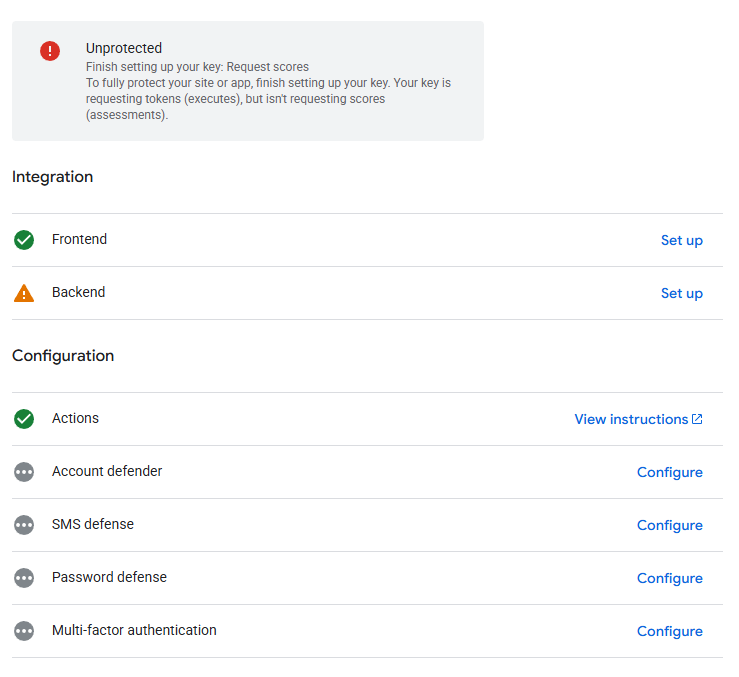
Recaptcha Backend is not protected. Secret Key & Client Key added to bricks. Setting toggled on the form for recaptcha.
Please advise
Please advise
Bricksforge had inherited reCaptcha from the Bricks form back then. Something must have changed since the last releases. I’ll take a look at it. In the meantime, hCaptcha and Turnstile are working 
Hi Danielle,
It looks like Bricks generates and sends the recaptchaToken along with the ajax form post request upon submission:
// (assets/js/frontend/js)

// STEP: reCAPTCHA (Google)
let recaptchaElement = document.getElementById(`recaptcha-${elementId}`)
let recaptchaErrorEl = form.querySelector('.recaptcha-error')

if (!recaptchaElement) {
  bricksSubmitForm(elementId, form, files, null)
  return
}

let recaptchaSiteKey = recaptchaElement.getAttribute('data-key')

if (!recaptchaSiteKey) {
  recaptchaErrorEl.classList.add('show')
  return
}

try {
  grecaptcha.ready(() => {
    try {
      grecaptcha
        .execute(recaptchaSiteKey, {
          action: 'bricks_form_submit'
        })
        .then((token) => {
          recaptchaErrorEl.classList.remove('show')

          bricksSubmitForm(elementId, form, files, token)
        })
        .catch((error) => {
          recaptchaErrorEl.classList.add('show')
          form.querySelector('.alert').innerText = `Google reCaptcha ${error}`
        })
    } catch (error) {
      recaptchaErrorEl.classList.add('show')
      form.querySelector('.alert').innerText = `Google reCaptcha ${error}`
    }
  })
} catch (error) {
  recaptchaErrorEl.classList.add('show')
  form.querySelector('.alert').innerText = `Google reCaptcha ${error}`
}
Then inside BricksSubmitForm():
function bricksSubmitForm(elementId, form, files, recaptchaToken, nonceRefreshed) {
  ...
  let formData = new FormData(form)
  ...
  formData.append('recaptchaToken', recaptchaToken || '')
  ...
}
Then, on the server they make the request to the Google’s ‘siteverify’ endpoint using the generated token:
// (includes/integrations/form/init.php)

/**
 * STEP: Google reCAPTCHA v3 (invisible)
 */
if (isset($this - > form_settings['enableRecaptcha'])) {
  $recaptcha_secret_key = \Bricks\ Database::get_setting('apiSecretKeyGoogleRecaptcha', false);
  $recaptcha_token = !empty($_POST['recaptchaToken']) ? sanitize_text_field($_POST['recaptchaToken']) : false;
  $recaptcha_verified = false;

  // Verify token @see https://developers.google.com/recaptcha/docs/verify
  if ($recaptcha_token && $recaptcha_secret_key) {
    $url = "https://www.google.com/recaptcha/api/siteverify?secret=$recaptcha_secret_key&response=$recaptcha_token";
    $recaptcha_response = \Bricks\ Helpers::remote_get($url);

    if (!is_wp_error($recaptcha_response) && wp_remote_retrieve_response_code($recaptcha_response) === 200) {
      $recaptcha = json_decode(wp_remote_retrieve_body($recaptcha_response));

      /*
       * Google reCAPTCHA v3 returns a score
       *
       * 1.0 is very likely a good interaction. 0.0 is very likely a bot.
       *
       * https://academy.bricksbuilder.io/article/form-element/#spam
       */
      $score = apply_filters('bricks/form/recaptcha_score_threshold', 0.5);

      // Action was set on the grecaptcha.execute (@see frontend.js)
      if ($recaptcha - > success && $recaptcha - > score >= $score && $recaptcha - > action == 'bricks_form_submit') {
        $recaptcha_verified = true;
      }
    }
  }

  if (!$recaptcha_verified) {
    $error = 'reCAPTCHA: '.esc_html__('Validation failed', 'bricks');

    if (!empty($recaptcha - > {
        'error-codes'
      })) {
      $error. = ' ['.implode(',', $recaptcha - > {
        'error-codes'
      }).
      ']';
    }

    wp_send_json_error(
      [
        'code' => 400,
        'action' => '',
        'type' => 'error',
        'message' => $error,
      ]
    );
  }
}
I’m not sure if you can hook into how Bricks are doing it but it would be quite helpful as we are getting a lot of emails with the “site not verified” from Google reCAPTCHA for all our sites using Pro Forms.
It would also be super handy to get the reCAPTCHA score as part of the submission data inside the dashboard but not necessary.
Thanks for your hard work!
Fixed. Will be deployed in the next version - probably in the next days